Mar 02 2017
- By HiScoreBob in Blog, Hardware
-
March 2, 2017
It’s 2017, and everyone is excited about 4K Gaming, except a few fellows who enjoy “Retro” Games. People like myself enjoy Games from the NES/SNES Era, when the optimal resolution was 240p.
With today’s standards, we expect modern Hardware (like the Raspberry Pi) to output video via a digital interface (HDMI) in 1080p (FullHD) minimum.
I still have an old CRT (a great Philips 32″ Matchline), which still are the best to play old games on. Now although I connect my raspberry Pi to this TV with it’s Composite Video (and outputs a Video Resolution of NTSC;), the image quality is wishy-washy.
Enter Pi2Scart, a great little add-on from arcadeforge.net, which plugs directly into the GPIO from the Raspberry Pi.
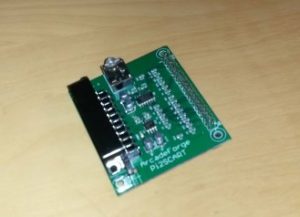
Pi2Scart
The Pi2Scart is able to output a clean RGB Video Signal (with a clean sync signal) and supports outputting a resolution of 240p, perfect for “Reto-Games”. The Sound is passed through with a small 3.5mm Minijack cable (provided with the Pi2Scart)
All it takes is a little modification of the Raspberry’s config.txt.
I personally use Lakka, and had to make following changes : (courtesy of Arcadeforge’s Scart2Pi Product page)
mount -o remount,rw /flash
nano /flash/config.txt
Insert following lines at the end of the file:
disable_audio_dither=1

dtparam=audio=on

dtoverlay=vga666

enable_dpi_lcd=1

display_default_lcd=1

dpi_group=2

dpi_mode=87

hdmi_timings=320 1 16 30 34 240 1 2 3 22 0 0 0 60 0 6400000 1
Make your changes, then ctrl+x to save.
mount -o remount,ro /flash
reboot
After rebooting, I had a very clean image, with crisp colors and a much better contrast than with the composite Video.
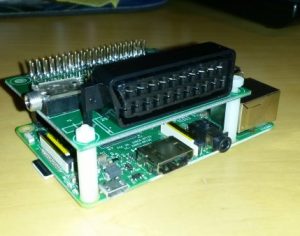
Pi2Scart mounted on a Raspberry Pi 3
I already have my usual systems (SNES, Mega Drive etc..) connected through RGB-Scart (see my RGB vs composite comparison) and I can tell the image quality of the Pi2Scart is equivalent of the quality of the original systems. (at least there is absolutely no noticeable difference)
With the Pi2Scart, it’s the first time I enjoy NES Games in RGB Quality, and it makes a huge difference in my opinion.
I’m happy with the Pi2Scart and can only recommend it to everyone who connects a Raspberry PI to a CRT.
Improvement in Picture quality cannot be better described than with some comparison pictures :
Left Picture = Composite, Right Picture = Pi2Scart (RGB) , use the Slider to adjust display.
For a GameBoy Game, the difference is very subtle
Notice the blurred lines around Mario in Super Mario Land 2 on GameBoy?
But as soon as there’s color, the difference is more noticable :
Zelda Oracle of Seasons on GBC
Mega Man 2 on the NES
Gunstar Heroes on Genesis / Mega Drive
Golden Axe Warrior on Sega Master System
With more detailed graphics, the difference becomes more and more visible:
Quackshot on on Genesis / Mega Drive
Super Mario World on SNES
Zelda Link to the Past on SNES
Some close-ups
Super Mario Bros. 3 Close-up on Mario
Quackshot Title Screen Close-up

HiScoreBob
Zënter 98 schaffen ech an der IT, an hunn säitdeem ëmmer gären Technologie installéiert an hier Problemer geléist.
Privat sinn ech bestued an eee stolze Papp. Sinn ëmmer fir eng Ronn Briet- a Videospiller an gudder Gesellschaft ze kréien.
Permanent link to this article: https://www.hiscorebob.lu/2017/03/pi2scart-rgb-video-for-raspberry-pi/