 This is part 2 of a series following the development of Loopy, my iPhone app.
In part 1, I wrote about Loopy’s interface. Part 2 will be more technical, and will cover some challenges encountered during the evolution of Loopy from concept and mockup to working software. Or, more specifically, the stupid things I did along the way.
The Long Path to Audio
Loopy’s audio implementation went through many revisions, as I both gained insight into the workings of the iPhone’s audio subsystem, and chased down performance.
Take One
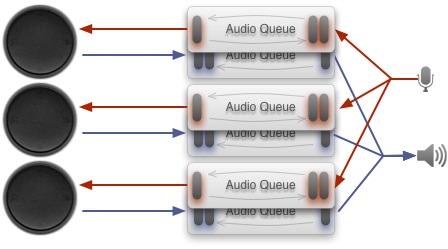
Audio implementation #1
The audio implementation that Loopy’s first prototype had was based on the common ‘Audio Queue’ services: Each track had an audio queue for playback, and an audio queue for recording. Each queue was just started and stopped as needed.
The problem here was the long delays: Whenever one started a recording queue, for example, there was a half-second-or-so delay before audio started coming in. Obviously, for a music app, this was crazy – you’d lose the first beat!
Take Two
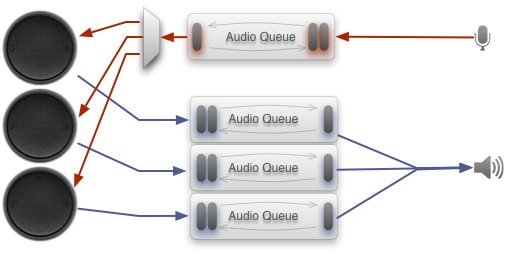
Audio implementation #2
The second attempt involved a single recording audio queue that was always running – when we weren’t recording, we’d just throw away the sound. When a track started recording, the recorded sound from the queue would be pushed into the recording track.
This did away with any startup delays – but the new problem was the time taken to start and stop tracks playing. Again, there was a half-second delay when tracks were started.
Take Three
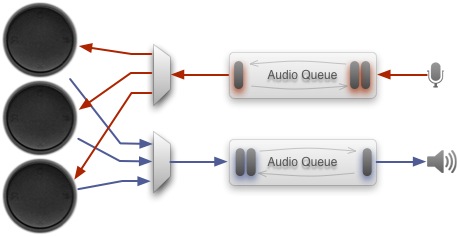
Audio implementation #3
The third attempt used a single playback queue, to avoid the play/stop delays. When no track was playing, silence would be output; when one or more tracks were playing, their audio would be manually mixed and given to the queue.
This nearly had it, but latency was just too long – if one tapped out a beat, the sound coming out of the speakers would be often half a beat behind, which really messed with one’s head.
Take Four
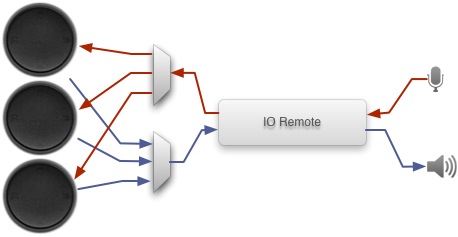
Audio implementation #4
The final implementation, which turned out fairly well, uses a system that is shrouded in mystery: Remote IO (or IO Remote, or The Great Audio Interface Of Doom depending on where you look)
The Remote IO system gives you near-direct access to the audio equipment, which means you can essentially pick the audio latency you want, at the cost of convenience and sanity.
Learning enough about this system to use it was a long process, and it ended up being a pastie.org snippet, random bits and pieces from a libSDL source code commit notification, and some obscure sample code from Apple that led me in the right direction. The lack of proper documentation here was quite absurd, and not at all helped by the stranglehold that Apple had placed on all development chatter at the time. Thankfully, things are moving in the right direction now. (I even got asked recently to write some documentation for Apple on the Remote IO framework, which was very cool, if mystifying)
Anyway, the new audio engine was fast and responsive, and I breathed a sigh of relief.
Echo Folly
 The other aspect of Loopy’s audio worth mentioning was my foray into echo cancellation – the original intention for Loopy was as a ‘performance’ device, able to be used without any necessary bits and pieces – like headphones – plugged in. This, of course, was complicated by the fact that the iPhone’s mic is right next to the speaker.
Consequently I decided to have a go at removing the echo signal from incoming audio.
Echo removal is actually a fairly interesting technology – at least, it is if you’re a geek like me. The general idea is that you have some audio playing, which you remember, and you have some audio recording. The recorded audio, because the speaker is nearby, consists of both the desired signal (singing, etc), plus a version of the audio coming out of the speaker.
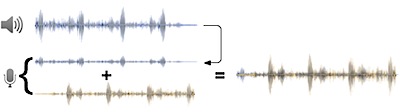
Because we remembered what we last put out the speaker, in theory we can then subtract the known audio from the recorded sound, to single out the original desired sound.
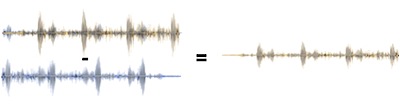
As with many such things, it’s a lot more complicated: We have to find the speaker’s sound in the recorded audio before we can subtract it. Even more tricky, it won’t be exactly the same, because it’s distorted by the speaker – the audio will be a different volume, and in the case of the iPhone’s speaker, the bass parts of the audio will be gone, for example. It will also be sampled differently to the original signal.
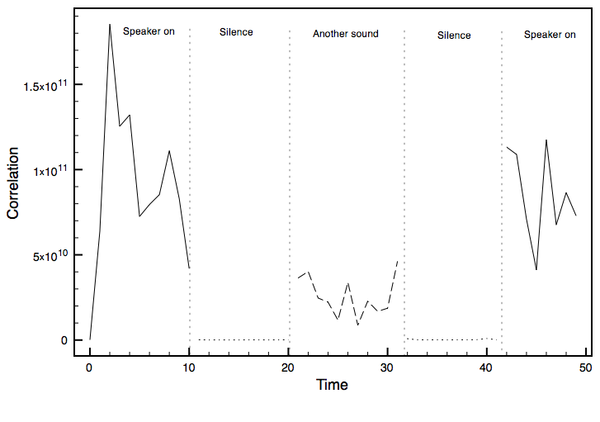
Testing correlation
Anyway, I gave it a go. Enthusiastic for the challenge, I started an implementation myself, which included a cross-correlation procedure to find the speaker’s audio in the recorded sound, and a routine to perform a subtraction, with a mechanism to ‘tune’ the procedure by determining how much audio was removed, and tuning parameters accordingly.
And, you know, I got close…but not close enough – not enough sound was removed to make it usable. The main issue was the lack of sophistication of my actual signal removal routine. There are algorithms that do a better job out there, but I didn’t have the time to spend researching them all. Maybe another day!
I tried a pre-built solution, built into the great Speex engine, but the requirements of the Speex echo cancellation library were much too great for the poor iPhone, and sound lag was huge.
So, in liu of having echo removal, Loopy now drops the speaker volume whenever it is recording (The U.S. spent $11 million developing a pen that works in space…The Russians used a pencil).
Seven Different Interfaces
The second major challenge was Loopy’s interface – the six rotating platters. The problem was update rate: The display had to appear smooth with all six tracks playing, which means a framerate of at least 20 frames per second, for all six tracks – at least 120 renders per second.
It sounds easy enough, but Loopy’s interface was re-implemented no less than seven times before I got it right. Some notable stages along this journey:
-
 The first implementation used a sequence of images to draw the rotating ring. The drawing routine (drawInRect for each of the six UIViews) would simply draw each image in turn.
This turned out to be too slow, and would completely block the interface with more than four tracks playing.
- Next, I tried putting the drawing routines into a thread, and then drawing to an off-screen buffer (actually, drawing into a UIImage). Then the UIView‘s drawing routine would only have to draw a single image, instead of compositing the background with the ring and other elements
My plan failed, however – at the time, I couldn’t for the life of me figure out how to draw into an image in a thread (from what I remember after I found out, I think one has to use a CGImage, or something, as the entire UIKit framework isn’t thread-safe), and even drawing a single image appeared to be too much to keep the framerate up, anyway.
-
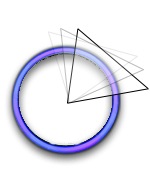 I discarded the pre-rendered images, and decided to go with an approach which didn’t require sending images to the iPhone’s video card each frame. Instead, I draw a mask and used that to mask out the ring image, with the mask rotated for each frame.
Surprisingly, even this technique was too slow, even after trying an implementation that consolidated the drawing for all six tracks into a single thread.

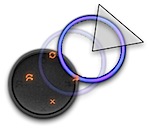 After some consultation with other developers, I realised that even Core Animation just wasn’t cut out to do this kind of rendering (I get the impression that Core Animation, too, creates and uploads image data to the video card for every frame), and threw it all out the window.
I re-implemented the whole thing in OpenGL, with the same ‘masking’ concept (but drawing rotating triangles with texture co-ordinates bound to screen co-ordinates), and got what I needed.
This new implementation was much simpler and easier to maintain – always a good sign that it’s the right one!
Start, Stop, Pad, Truncate
Timing of loop recording was quite tricky to get right – deceptively so.
Right from the start, Loopy’s timing mechanism has been based upon a ‘clock’, which defined a length of time representing a base loop length – in musical terms, a bar.
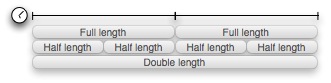
Tracks could then be multiples of the bar length, or a half, a quarter or an eighth of the bar. They could also be offset by a certain amount of time, meaning that recordings could start any time and would be kept in sync.
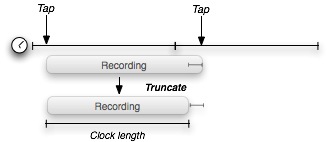
The original implementation forced the recording to extend to multiples of the ‘clock’ length:
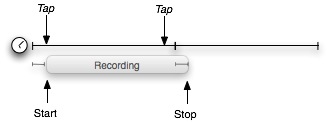
This meant that if you tapped to stop recording, the track would continue recording anyway, until the next clock tick (or half-tick, etc.), plus offset, was reached. This was the “don’t trust the user” approach, assuming that users wouldn’t keep time properly and would need to be guided.
I tried several variations on this theme, testing different logic, such as if the recording length is more than X time than the clock length, keep recording until the next tick, otherwise stop and delete the last X of the track.
That whole concept was generally a bad idea, though, and resulted in people (including myself, once or twice) thinking the interface wasn’t working properly.
The final implementation stops as soon as directed, which feels much better. It will either pad the rest of the track, so that it is up to multiples of the clock length (or a full quarter/half/etc.):
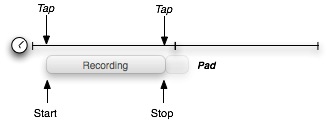
…or it will truncate if it’s within some threshold of a beat:
Something I realised as I was using it was that it was impossible to record things like anacruses (AKA upbeats), where a riff starts just before a beat. With some experimentation, I decided to replace the straight truncation with a mix-then-truncate approach:
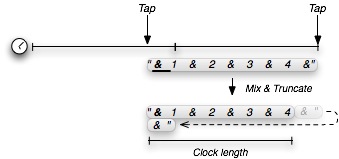
This is how Loopy operates now, and I think it works fairly well.
A Sense of Rhythm
The other timing issue was related to synchronisation and recorder latency – that is, if you record one track, then record another one, you want both recordings to be in time with each other. This was, and still is, tricky.
One has to track the latency for both the ‘play’ path – the time taken for audio in the memory buffer to get pushed out the speaker and heard – and the ‘record’ path – the time taken for sound to be digitised and stored in a buffer.
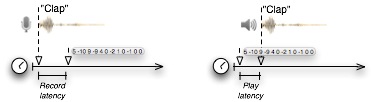
In Loopy’s current implementation, this latency estimation is a hard-coded number worked out during testing: This number is used to offset the time associated with a recording, so that it stays in sync. And on my iPhone, it works great. However, I hear reports that the timing is off for other users, and so this is still an outstanding issue.
Does this mean that latency varies between devices – manufacturing variations? Or, is it software-based – perhaps if the device is busy doing some other things, like checking email, latency will increase?
Time will tell, I suppose.
The Way Forward
Good software is a constantly-evolving thing, which grows and is guided by its users, and this is certainly the plan for Loopy. I recently wrote a status update on Loopy, which outlines a little of the planned path.
While the original idea for Loopy was very constrained, many users are already seeing a much greater potential, which is exciting and gratifying, and I’m looking forward to taking it in new directions.
At some stage, I would like to write a third article for this series, covering promotion. This will be a while in coming, though, as this is a learning curve I have yet to climb! I will say this: My next experiment will be the creation of a free, “Lite” version of Loopy, which advertises the full version. This seems to have worked ridiculously well for some, so it’s well worth a shot!
For those who made it this far, thanks for reading – I’d love to hear your comments on these articles, and on Loopy itself.