I got on the internet with my microcomputer, an Atari 130XE, through my university. My setup looked a lot like this linked photo, except I also had a 1200 bps phone modem.
https://classic-computers.org.nz/collection/atari-130xe-1920x.jpg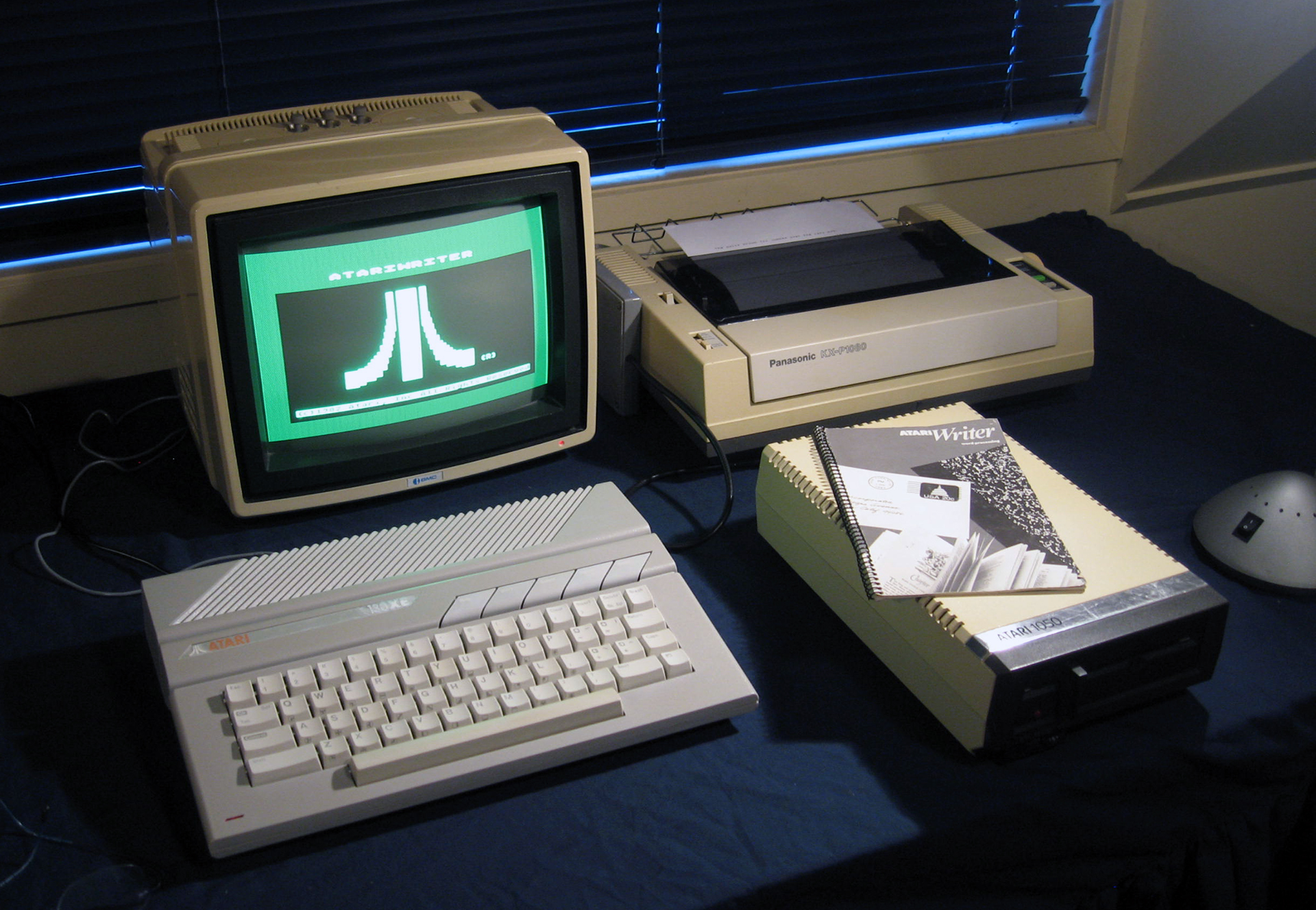
I had a program that turned my Atari into an 80-column VT-100 terminal. That’s what I generally used for getting on the internet. Though, to get that, I bought Chameleon, a VT-52 emulator, which emulated 80 columns on a 40-column screen.
Chameleon
As I remember, I got the VT-100 emulator, called VT-10Squared, through an FTP site called the Atari Archive at the University of Michigan.
From then on, I generally used VT-10Squared for my internet access, and only used Chameleon when I wanted to download something, since VT-10Sq had no functionality for downloading files. It just acted as a terminal.
From there, it was just text. Since I had terminal emulation, a program on the other end could direct the cursor where to go on the screen. So, if I wanted to use a text editor, that’s what it would do. I could get full-screen editing of text files any time I wanted. I could also do real-time chat, through a program called “talk”, where it would set up a split-screen, my text on top, the other person’s text on the bottom.
As I indicated, I could download files. This was a two-step process. First, I would use FTP to log on anonymously to a site that permitted it. From there, I could use commands to look around in some directories on the remote system, and download any files I wanted. These would be saved on the Unix server I’d logged into.
That’s something I should point out. There was really no way to get onto the internet directly. You had to first log in to a campus system, and from there you could use internet services. Everything was done through a command line. Once you were logged in, you would get a prompt to type commands.
Setting up a download to my computer at home was a bit complicated, but doable. Like I said, I’d get out of VT-10Sq, and switch to Chameleon. I could do this while remaining online, since the modem wasn’t affected if I rebooted my computer. That’s generally what I had to do to change between tools and applications. I couldn’t just “quit,” and run something else. I’d have to cold- or warm-boot the computer, take a disk out of the disk drive, and put a new disk in.
Another thing was, at least at my school, we didn’t directly connect to campus Unix systems, either. We had these things called terminal servers. That’s what would actually take our calls when we connected with our modems. Once connected, we’d get a prompt, where we would give it the address of a system where we had an account, and it would connect to that system. From then on, it would just relay the I/O between me and the system I was connected to. It was possible to get back to a terminal server by logging out of one’s account. Though, there may have been a way to “escape” to it, without logging out. I forget.
To do a binary download, it was necessary to configure the terminal server session to allow that to work. This was accomplished with a command or two. Then you could go back to your Unix session, and the Unix system had a couple modem protocol commands you could use to do an upload or download. I used the simplest, and one of the oldest, called x-modem. It wasn’t that efficient, but it was reliable, and compatible with Chameleon. The file transfer protocols for use with modems had error-checking built-in, because line noise on phone lines was a rather common problem. So, you needed error-checking to make sure your files came through alright.
The protocols didn’t compress anything. If you wanted to compress a file, to make it smaller, and therefore the download quicker, you had to either get the file already compressed, or you had to compress it using tools available on the Unix system. Generally, files were already compressed when you got them. You had to uncompress them using tools on your computer, after you’d downloaded them, just like today. In my case, that took some time.
Most other people who had their own computers they used to get online (most students at the time didn’t) used DOS PC clones, with a smattering of people who had Macs, upgraded Apple IIe’s, or IIGS’s, Atari STs, Commodore Amigas, or 128′s. They used phone modems and terminal software, as well. They could do all the same things I described, if they learned how.
Other things you could do online were e-mail, and readnews (also called Usenet). Readnews was thousands of online discussion forums that you could subscribe to/follow.
It was possible to play online games through the internet, even just in text, since terminal emulation allowed games to draw pictures on the screen using text characters. These were turn-based adventure/combat games, though. There were MUDs (Multi-User Dungeons), as well, that was online Dungeons & Dragons, played like text adventures. Though, I didn’t start getting into internet gaming until our university got X-terminals, which had a graphical display. I didn’t see this until the 1990s. Almost nobody ran X/Windows on their computer at home, though.