This question shows research effort; it is useful and clear
31
Save this question.
Show activity on this post.
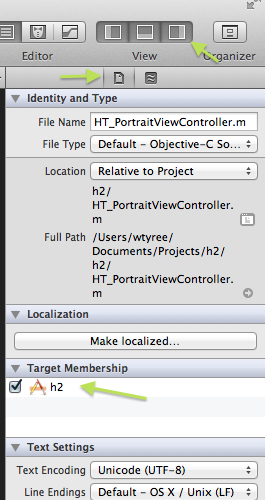
Since upgrading to xcode 4, I can't find where to specify what Target a resource belongs to. Previously, I selected the file and hit command+i, but this now seems to run the program, rather than bring up the info box for that file.

37.1k53 gold badges208 silver badges339 bronze badges
asked Mar 14, 2011 at 15:34

2
Select the project file in the document explorer. On the Right margin of the Xcode window make sure to display the right drawer view if it isn't already there (it usually has Object library and Quick Help). In the top margin, click on the icon that looks like a document (rather than the one with the waves that is quick help). The target membership and the other info from the old Get Info command is there.

15k9 gold badges63 silver badges90 bronze badges
answered Mar 14, 2011 at 15:42

4 Comments

This doesn't seem to work for "blue" folders like it did in XCode 3. I see the method you're referring to, though, and it seems to work for all regular files.

By "right margin" you mean the File Inspector utility (View -> Utilities -> File Inspector).
@Richard. Yes, the Utilities view and File inspector. Thanks

Screenshots would sometimes be a godsend here. Thank you.
Select the project file in the document explorer pane, select your target from the list, select the build phases tab and add/remove your resources in the copy bundle resources phase or source code in the compile sources phase.
answered Mar 14, 2011 at 15:38

Comments
Right click on a folder (eg. resource) on the document explorer (which is the left column with all your files and folders in your project), select Add Files to "Project Name". Below you will see check boxes that determine the file's association with each target.
@makdad - This also works for the 'blue folder' situation.
Note: if you already have a file in xcode, the only way you can add targets to a file that's in a 'blue folder' is to remove the file and follow the steps stated above.
answered Jul 18, 2011 at 8:47

Comments
Explore related questions
See similar questions with these tags.