Tech
We follow up our Skype phone roundup with the Linksys CIT400. It's a Skype …
All you need is a router…
 Linksys iPhone CIT400
Manufacturer: Linksys (product page)
System requirements: Broadband internet connection, router
Price: $149 (shop for this item)
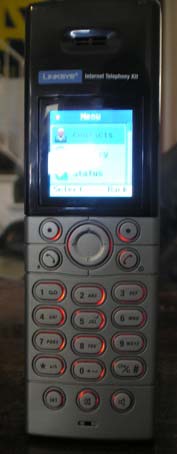
Red backlights are nice,
albeit rather useless
A few months ago I did a Skype phone shootout involving two cordless Skype phones. I concluded that, for a host of reasons, the Linksys CIT300 was the better of the two phones. However, a few of our readers were upset that I had failed to mention neither of the phones were compatible with Mac OS X. The newest Linksys cordless phone, the iPhone CIT400, does not require a computer at all and is my favorite cordless Skype phone yet. Here's why.
The CIT400 works in the same way the Linksys CIT300 does in that it requires a base station. Here's the part I love most, though: the base station does not need to be connected to your computer with a USB cable; it just needs to be connected to a router. This means the phone isn't tied down to any particular OS, opening up the cordless phone market to any Skype user, no matter what your operating system. I recommend creating a new Skype account if you plan on purchasing a CIT400; that way, buddies can reach you at your computer on one account or downstairs in your living room on another. In terms of call quality, I was able to hold clear phone calls around my house without dropping any calls.
Like the CIT300, if you'd like to make standard POTS calls, you can also do so through the base station. I really found this feature to be the big seller with this phone. One of the most annoying problems I ran into with a USB cordless phone is that whenever I wanted to switch to a standard headset/webcam call, I ran into a host of connection problems due to the switching of in/out audio devices in my Skype preferences. The CIT400 eliminates this problem.
In terms of wireless connectivity, the wireless connection to my Netgear wireless-G router was strong enough that I was able to hold phone calls around my house without dropping any calls, although Linksys only specifies that "a broadband router" is needed for phone calls.
By the way, if you're wondering about the iPhone moniker, Cisco trademarked it first, but both Cisco and Apple are able to use the name for their own products under the terms of a settlement reached earlier this year.
The Unit
The CIT400 has the same battery life as the CIT300—120 hours of standby time and 10 hours talk time—and I found these numbers to be accurate. Three days ago, my roommate unplugged the phone, and it's currently sitting half-charged. In terms of the interface, the CIT400 comes pre-loaded with Skype, just like the model before it. The CIT300 allowed for a bit more customization, as I was able to change the phone's background and theme.
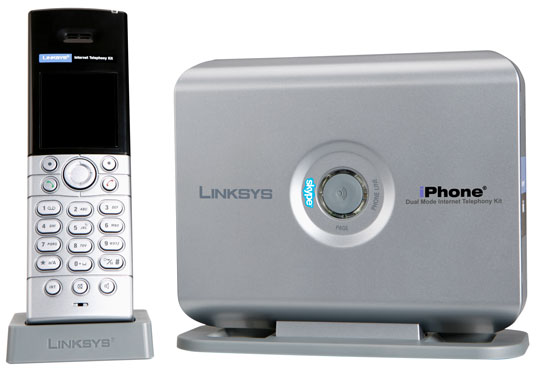
The iPhone CIT400 and base station
I would have liked to see this option in the CIT400, but it seems Linksys has ditched the customization idea for a strictly Skype theme. Linksys also carried over the intercom, speakerphone, and page-phone options found on the CIT300. Unfortunately, however, Linksys advertises that you can add additional phones for an intercom feature. At this time, additional handsets are not available for individual purchase, so the feature is basically useless unless you'd like to purchase the entire package each time you want to add an additional handset.
Performance matters
Talking about phone aesthetics can be pretty dry, and as long as a phone performs well, I typically take the stance that performance is all that really matters. With cordless Skype phones, though, I prefer a color screen with the typical Skype menu because it makes navigating through contacts and the tweaking of phone settings much easier. I liked the look and feel of the CIT300, and the CIT400 is a bit of a step up.
The upper half of the phone is made of a shiny black plastic, but unfortunately, it's the type that always seems to be coated with fingerprint and face grease. Gross. The buttons still have a soft red backlight glow to them, but the glow doesn't light up the keys and is more fancy than useful in the dark. The phone's screen itself does not provide enough light to brighten the keys. Unless you have the phone's number pad and navigation buttons memorized, it's pretty much impossible to make a phone call in the dark if you're planning on dialing numbers. I found this feature to be really annoying; I don't make phone calls in the dark very often, but if Linksys is going to bother adding backlit keys, why not make keys with numbers that actually glow? Adding clear keys would have solved the problem.
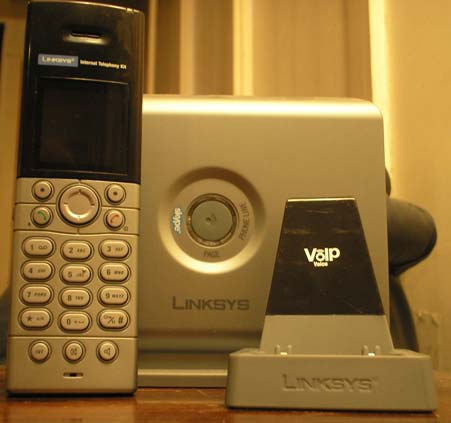
The CIT400 next to its cradle
Navigation of the phone's interface is basic: the CIT400 has a central circular click button which clicks up, down, left, and right. Much like a cell phone, one can select an option or navigate backwards through the menu with one of two buttons to the left and right of the centralized main button.
Here's a brief rundown of the standard cordless Skype phone menu: at the main screen, the phone displays the name of the Skype user currently logged on, the current time, battery life, signal strength, and two options: "Menu" and "Contact." To see Skype buddies that are currently online, simply click "Contact." From this screen you'll be presented with your Skype buddy list where you can scroll through available buddies and place phone calls. Back at the main screen, choosing the "Menu" option brings you to a standardized Skype menu screen with the following options: Contacts, History, Status, Add Contact, Search, Services, and Settings. If you'd like to add a contact, simply click "Add Contact." The phone gives you a choice between a Skype contact and a SkypeOut contact. SkypeOut contacts are landline numbers you can call from your Skype username.
To make SkypeOut calls, you'll need to be a subscriber of Skype's SkypeOut service, which currently sets you back $29.95 a year. If you use standard phone lines, you can also use the phone to call normal telephone numbers by simply dialing any number and clicking the green call button. Your standard telephone rates will still apply, and the phone will work like any other cordless house phone.
Unfortunately, I was not able to find an option that allowed me to store landline phone numbers for non-Skype calls. The addition of a microSD slot is certainly something Linksys should consider for future models. A memory card would open up the possibility of being able to store MP3s for ring tones, pictures for personalized backgrounds, and storage for standard landline phone numbers.
One bit of information I failed to mention in my previous Skype phone roundup is that Linksys provides a warning on their boxes which recommends their Skype phones not be used to place emergency phone calls. It's an important warning, because if the electricity goes out, you'll be losing router power and obviously will not remain connected to the Internet, thus the inability to place SkypeOut phone calls to 911. I have an inkling that anyone interested in a cordless Skype phones also has a cell phone, but it's worth noting that you should continue to maintain a landline phone connection just in case an emergency arises that requires a call to 911.
Conclusion
The Linksys CIT400 is the best cordless Skype phone I've had a chance to review. It's versatile, it's simple, and it works. It's versatile in that it doesn't require a computer to run Skype, and by eliminating your PC from the equation, the cordless phone works much more like a standard cordless phone. The CIT400 is simple because it takes two seconds to install—just plug the base station into your router, plug the charging base and base station into the wall, and you're set. It has solid battery life and provides clear, crisp phone calls throughout my entire house. As a follow-up review, I have to recommend the CIT400 to anyone interested in a cordless Skype phone, even after praising the CIT300 in my prior review.

Pros
- Versatile
- Not tied down to a particular OS
- Solid feel, good-looking
- Easy-to-navigate menu, just like Skype
- Satisfactory battery life
Cons
- Extra handsets not available at this time
- Number-pad backlight is useless