few days ago i dropped an article about MCP on X and the response honestly surprised me
DMs flooded in
people were saving it, sharing it, asking for more
so today i'm going back to the well with something people have been asking about constantly: Claude Skills
here's the thing about this article
i'm not going to give you the same recycled explanation you've seen everywhere else
i've spent weeks actually building skills, breaking things, figuring out what works and what completely fails
i've created over a dozen custom skills at this point
some of them flopped hard
some of them changed how i work with Claude forever
this whole breakdown comes from that hands-on experience, not from summarizing documentation you could read yourself
i'll also share the exact resources i learned from so you can go deeper if you want
but my goal here is simple: by the time you finish reading this, you won't just understand what Skills are
you'll be ready to build your first one tonight
no fluff, no generic advice, just the system that actually works
let's get into it
What Are Claude Skills, Really?
Skills are instruction packages that give Claude specialized knowledge it doesn't have built in
That's the simple version. Here's what that actually means.
Claude knows a ton. But it doesn't know your company's brand guidelines. It doesn't know the specific way your team formats financial reports. It doesn't know the workflow your industry uses for compliance documentation.
Skills fill those gaps. They provide four types of knowledge:
Step-by-step workflows tell Claude exactly how to complete a process in order. First do this, then that, then check this thing.
Domain expertise gives Claude the rules and standards for your specific field. What's acceptable in healthcare documentation. How legal contracts should be structured. The conventions your industry expects.
Tool integrations teach Claude how to work with specific file formats the right way. Not just creating an Excel file, but creating one with working formulas and proper formatting.
Reusable resources include scripts, templates, and reference docs that Claude can pull from when needed. Your actual templates, not generic ones.
Here's the analogy that clicked for me: Imagine hiring someone incredibly smart but giving them zero onboarding. They'd figure things out eventually, but they'd make mistakes along the way. Skills are the onboarding docs that help Claude perform like a trained specialist from day one.
One thing Skills are not: they're not just fancy prompts. They're not custom instructions you type into a chat. They're structured packages that persist across conversations and include actual files Claude can work with.
Why This Matters for Your Work

Three problems plague almost everyone who uses Claude regularly.
The consistency problem. Ask Claude the same question on Monday and Tuesday, you might get two different answers. Different structure. Different depth. Different approach. Skills lock in consistent outputs because Claude follows the same instructions every time.
The quality problem. Claude gives decent outputs, but it misses things you know. Industry best practices. Your team's specific standards. The nuances that separate good from great in your field. Skills teach Claude what you've learned.
The efficiency problem. You waste time re-explaining context every conversation. Your role. Your preferences. Your constraints. Skills remember so you don't have to repeat yourself.
Here's what changes when you start using Skills:
Your presentations automatically follow your brand guidelines. Your documents include tracked changes formatted correctly every single time. Your spreadsheets have working formulas because the skill knows how to validate them before delivering.
Create a skill once, use it forever. Share it with your team. Everyone gets the same quality output.
Inside a Skill: The Anatomy
Every skill lives in a folder. That folder has a specific structure. Understanding it makes everything else click.
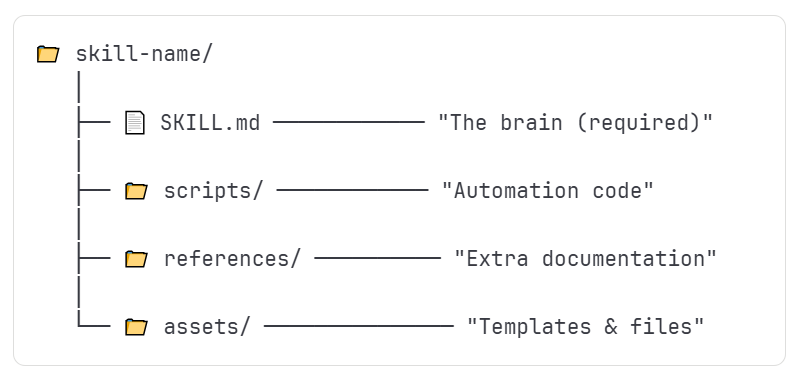
Let's break down each piece.
The SKILL.md File:
yaml
                            ← FRONTMATTER STARTS
name: meeting-notes-processor    ← SKILL NAME (kebab-case)
description: "Transforms..."     ← TRIGGER DESCRIPTION (critical!)
                              ← FRONTMATTER ENDS

## Core Rules                    ← BODY STARTS
1. Always extract action items   ← INSTRUCTIONS CLAUDE FOLLOWS
2. Summarize decisions made
This is the only required file. Everything else is optional.
SKILL.md has two parts: frontmatter and body. The frontmatter is metadata in YAML format at the top of the file. It contains the name and description.
name: my-skill-name
description: "Creates financial reports with proper formatting and formula validation. Use when user asks for financial analysis, budget reports, or spreadsheet creation."
The description field matters more than you'd think. It tells Claude when to activate this skill. If your description is vague, the skill won't trigger when you need it. Be specific about what the skill does and when it should kick in.
The body contains everything else: rules to follow, examples of good output, workflows to execute, and anti-patterns to avoid.
The Scripts Folder:
This holds Python or Bash code Claude can actually run.
Use scripts for tasks that need to work exactly the same way every time. A script that validates Excel formulas before delivering. A script that checks document formatting against your standards. Automation that removes human error from repetitive tasks.
The References Folder:
Extra documentation Claude reads when it needs more context.
This keeps your SKILL.md file lean. Instead of cramming everything into one document, you move detailed information here. API documentation. Database schemas. Lengthy style guides. Claude pulls from these files when relevant.
The Assets Folder:
Files used in the output, not for reading.
Templates, images, fonts, boilerplate code. If Claude needs to use a file rather than read it for instructions, it goes here. Your PowerPoint template. Your company logo. A starter HTML file for web projects.
Think of SKILL.md as the manager giving instructions. Scripts, references, and assets are the tools and materials the worker uses to get the job done.
Skills You Can Use Right Now
Anthropic already built several professional skills you can enable today. No setup required.
The DOCX skill creates and edits Word documents properly. Tracked changes that work. Comments that appear where they should. Tables and images that don't break formatting. If you've ever had Claude create a Word doc that looked mangled when you opened it, this skill fixes that.
The XLSX skill builds spreadsheets with formulas that actually calculate. Professional formatting. Color-coded financial models. It even validates formulas before delivering, so you don't get a beautiful spreadsheet that's secretly broken.
The PDF skill handles everything PDF-related. Reading, merging, splitting, rotating. Filling out forms. Extracting tables from scanned documents. If it involves a PDF, this skill has you covered.
The PPTX skill creates presentations that look designed. Not just bullet points on white slides. Proper color palettes, font pairings, layouts that vary. The kind of slides you're not embarrassed to present.
The Frontend Design skill builds web interfaces that don't scream "AI made this." It avoids the generic aesthetic everyone recognizes, creating components that look custom-built.
These built-in skills handle the common stuff. But the real power comes from creating your own.
How Skills Actually Work Behind the Scenes
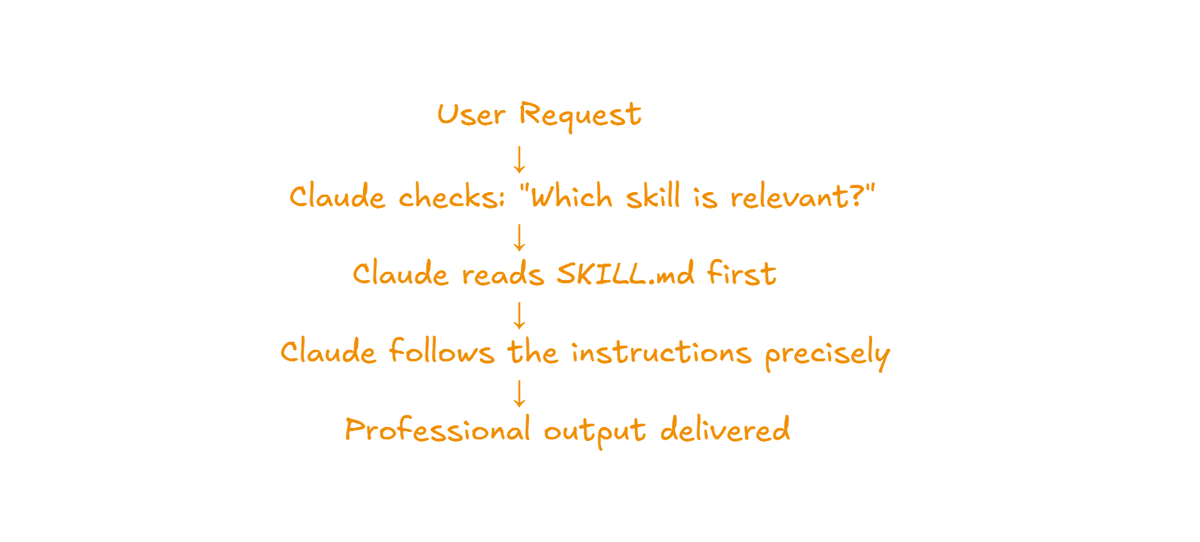
Skills don't load everything into memory at once. That would be wasteful. Instead, they use a smart system called progressive disclosure.
yaml
You: "Make me a PowerPoint about climate change"
     ↓
Claude: [Reads /mnt/skills/public/pptx/SKILL.md]
     ↓
Claude learns:
  - Use bold color palettes, not boring blue
  - Every slide needs a visual element
  - Use proper font pairings (Georgia + Calibri)
  - QA the slides visually after creation
     ↓
Claude creates a professional presentation
Level 1: Just the name and description are always available. About 100 tokens. Claude scans these to know what skills exist.
Level 2: The full SKILL.md loads only when the skill triggers. Claude needs the instructions, so it reads them.
Level 3: Scripts, references, and assets load only when Claude actually needs them. No wasted context.
Why does this matter? Claude has limited working memory (the context window). Loading everything upfront would leave less room for your actual conversation. This system keeps things efficient.
Here's the flow when you send a message:
You make a request. Claude scans all available skill descriptions. If your request matches a skill's description, that skill activates. Claude reads the SKILL.md instructions before taking any action. Then it follows those instructions to complete your task.
The description field controls everything. If it doesn't clearly explain when to trigger, the skill sits unused. Write descriptions that include what the skill does and the kinds of requests that should activate it.
Build Your First Skill: A Step-by-Step Walkthrough
This is where it gets real. Let's actually build something.
Step 1: Pick Your Problem
Ask yourself two questions. What task do I explain to Claude repeatedly? What knowledge do I have that Claude doesn't?
Write down 5 to 10 specific requests you might make that relate to this task. These become your test cases later.
Step 2: Create the Folder
Make a new folder with your skill name. Use kebab-case: lowercase letters with hyphens between words. Something like meeting-notes-processor or brand-content-creator.
Only add subfolders if you actually need them. You can start with just SKILL.md and add scripts, references, or assets later.
Step 3: Write the Frontmatter
At the top of your SKILL.md file:
yaml
name: meeting-notes-processor
description: "Transforms meeting transcripts into structured action items and summaries. Use when user uploads meeting notes, asks to process a transcript, or requests meeting summaries with action items."
Step 4: Write the Body
Start with what matters most. Put critical rules at the top.
markdown
## Core Rules
1. Always extract action items with owner names and due dates
2. Summarize decisions made, not just topics discussed
3. Flag any unresolved questions that need follow-up
4. Keep summaries under 500 words unless user specifies otherwise

## Output Format
- Executive summary (3-5 sentences)
- Decisions made (bulleted list)
- Action items (table with owner, task, due date)
- Open questions (bulleted list)

## Anti-patterns
- Don't include timestamps unless specifically requested
- Don't summarize small talk or off-topic discussion
- Never assign action items to "the team" - get specific names
Include examples if they help. Show input and expected output. Claude learns from patterns.
Step 5: Add Supporting Files (If Needed)
Scripts go in the scripts folder. Test them independently before including them.
Reference docs go in references. Move anything too detailed for SKILL.md here.
Templates and files Claude should use go in assets.
Step 6: Package It
A .skill file is just a ZIP with a different extension. Here's a simple Python script:
python
import zipfile
from pathlib import Path

skill_folder = Path("meeting-notes-processor")
output_file = Path("meeting-notes-processor.skill")

with zipfile.ZipFile(output_file, 'w') as z:
    for file in skill_folder.rglob('*'):
        if file.is_file():
            z.write(file, file.relative_to(skill_folder.parent))
Run it, and you have a packaged skill ready to upload.
Step 7: Test and Iterate
Upload to Claude settings. Test with your original use cases. Pay attention to what works and what doesn't.
Your first skill won't be perfect. That's fine. The magic happens in iteration. Use it, notice gaps, fix them, repeat.
Best Practices That Actually Matter
After building dozens of skills, patterns emerge. Here's what separates good skills from frustrating ones.
On writing instructions: Be concise. Claude is smart. Don't explain things it already knows. Use examples instead of lengthy explanations. Show, don't tell. Front-load the important stuff because Claude pays more attention to content at the top.
On writing descriptions: Include what the skill does and when it should trigger. Add variations of how someone might phrase requests. "Creates Word documents with tracked changes for legal review" beats "Creates documents" every time.
On choosing how much freedom to give: Some tasks have one right way. Others have multiple valid approaches. Match your instruction specificity to the task. Financial calculations need strict rules. Creative writing needs room to breathe.
On organization: Keep SKILL.md under 500 lines. Move detailed reference material to the references folder. Don't create files that serve no purpose. Test scripts independently before bundling them.
Mistakes That Will Trip You Up
Learn from what goes wrong for everyone.
Content mistakes: Explaining things Claude already knows just wastes tokens. Writing vague descriptions that never trigger. Cramming too much into SKILL.md when it should be split across files.
Structure mistakes: Putting files in wrong folders. Forgetting the frontmatter or formatting it wrong. Using spaces or uppercase in skill names. Including junk files like .DS_Store.
Trigger mistakes: Putting "when to use this skill" in the body instead of the description field where Claude actually looks. Writing descriptions too generic to match specific requests.
Testing mistakes: Not testing scripts before packaging. Testing with generic prompts instead of realistic use cases. Celebrating after one successful test instead of trying edge cases.
Real Skills to Inspire Your First Build
Three concrete ideas to get your wheels turning.
Viral Content Creator Skill
The problem: Writing social content that actually gets engagement instead of disappearing into the void.
What it includes: Proven hook formulas. Thread templates with clear structure. Platform-specific rules for Twitter vs LinkedIn vs Instagram. Anti-patterns that kill engagement.
Triggers on: "Write a Twitter thread about X" or "Create a LinkedIn post for Y" or "Help me write a viral hook."
The insight: The skill teaches Claude engagement patterns that took you months to learn. Fresh takes, not recycled advice.
Meeting Notes Processor Skill
The problem: Messy transcripts that take forever to turn into useful summaries.
What it includes: Summary template with consistent sections. Action item extraction rules. Formatting for attendee mentions. Follow-up question flagging.
Triggers on: "Process these meeting notes" or "Summarize this transcript" or "Extract action items from this call."
The insight: Consistent output every time regardless of meeting length or how rambling the discussion got.
Code Review Assistant Skill
The problem: Getting thorough code reviews that don't miss important issues.
What it includes: Review checklist covering security, performance, and maintainability. Severity levels for different issues. Example feedback formats. Language-specific rules for your tech stack.
Triggers on: "Review this code" or "Check this PR for issues" or "What could break in this function?"
The insight: Nothing gets missed, and feedback follows your team's standards for how to communicate issues.
These are starting points. The best skills come from your own repeated frustrations. What do you keep explaining? That's your first skill.
Going Further: Advanced Techniques
Once you have the basics down, these techniques unlock more power.
Combining multiple skills: Claude can use several skills together on complex tasks. Your Brand Guidelines skill plus the DOCX skill creates on-brand documents automatically. Skills work together without you managing the coordination.
Advanced scripting: Scripts can call external APIs. They can process files before Claude works with them. They can validate outputs before delivering to catch errors automatically.
Smart reference organization: Split large reference files by topic so Claude only loads what's relevant. Use clear file names. Include a table of contents in long reference docs so Claude navigates efficiently.
If you want to stay updated with the latest AI news and tools and research paper breakdowns... subscribe to my free newsletter: