
If you’re a developer building web or mobile apps that use Google Drive for storing information, you’ve probably found that users really can’t be trusted not to delete or move that data. Once the user does that, the app experience won’t be so great and the data that the app needs to run isn’t there to use.
Today, Google has introduced “app data folders” which are protected and can’t be seen by users within their Drive account. Other apps can’t see the files either, so there is now an added layer of security to fight off bad actors who build apps to swipe information or do other damage.
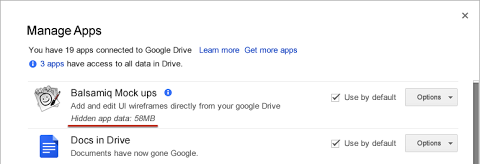
The Google Drive team suggests that these app data folders are used for configuration files, app state data or files that shouldn’t be modified in any way. Even though users can’t see the data, they can see how much space it is taking up on their devices and clear the data at any time.
Here’s what you’ll see as a user in your manage apps panel:
Additionally, “custom properties” can be added to Drive files that will allow developers to create searchable fields that are either app-specific or are to be shared with other apps.
More information about the Drive SDK can be found on StackOverflow, a site oddly not owned or operated by Google.
Techcrunch event
San Francisco, CA | October 13-15, 2026
[Photo credit: Flickr]
Topics
Drew is a geek who first worked at AOL when he was 16 years old. Drew was a senior writer at TechCrunch. Most recently, Drew was the VP of Communications for venture equity fund Scaleworks.