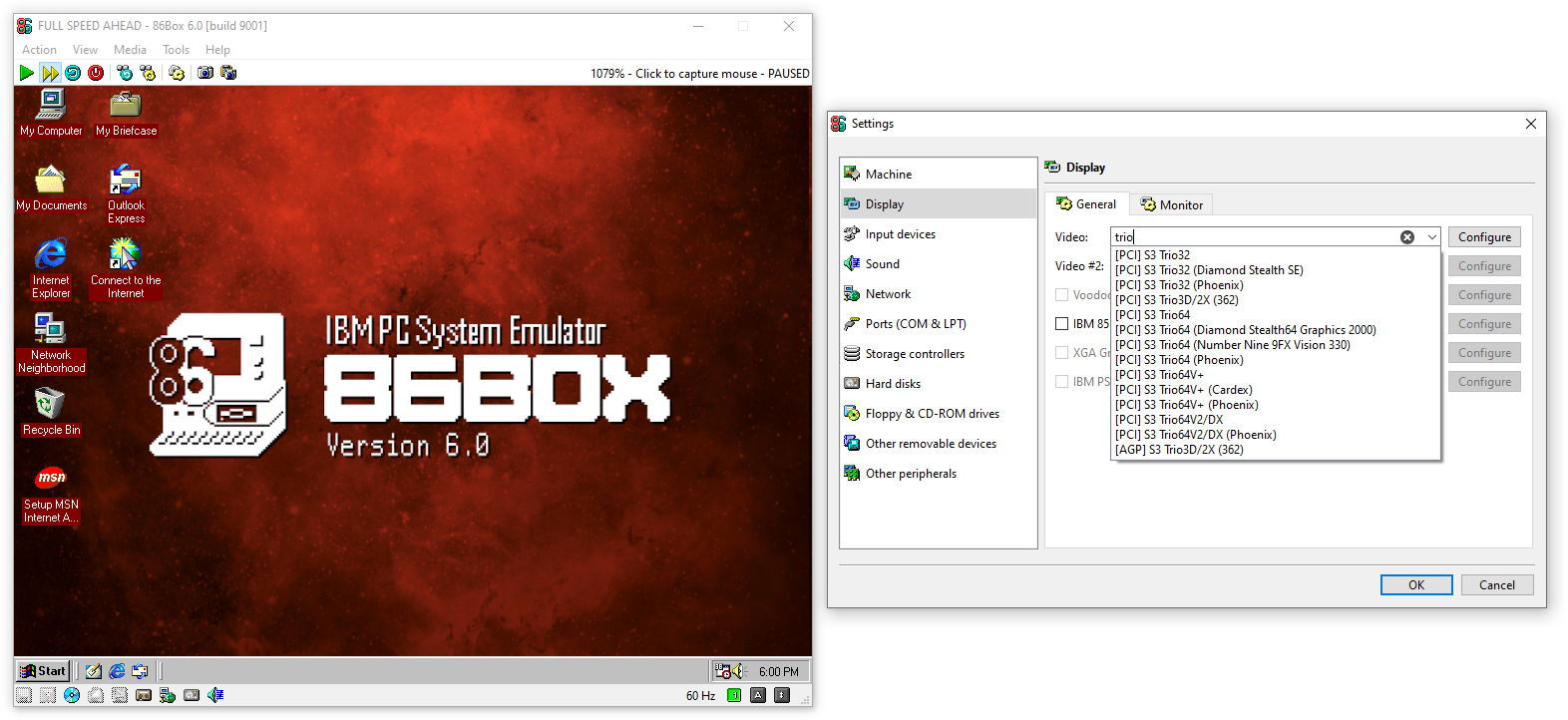
This is the May 2026 update to 86Box, bringing in the obligatory bugfixes, some performance improvements, user interface updates and lots of new hardware.
Main features
After the floppy drive sounds feature in v5.2, the same contributor now brings in hard disk sounds, configurable through the hard disk settings separately from the existing model presets. Recordings from three 3600 RPM disk models are currently available, with more to come in the future.
The long-awaited local switch allows for networking multiple 86Box machines running on the same host computer and across multiple hosts on the same real network, automatically and across platforms, unlike previous solutions such as VDE which required manual configuration and left Windows users in the dark. Multiple networks can be created and isolated by passwords, and more technically-inclined users can connect other emulators to the switch; see the documentation for more information.
Serial and parallel connectivity also saw many updates. On the parallel side, printers are now configurable, new sound devices join the existing DACs, and the new Named Pipe device can connect machines together with a LapLink cable or the rare DirectParallel cable for high-speed Windows Direct Cable Connection. On the serial side, the passthrough feature has evolved into serial devices bringing many improvements: Named Pipe (now supported on Linux and macOS) has an automatic client/server mode, Serial Passthrough no longer requires setting the host port’s baud rate separately, and Virtual Console (now supported on Windows) can automatically connect a terminal to the emulated port.
SCSI tape drives are now emulated, in case you’re emulating a retro server and want to make period-accurate backups. Tape drives for the floppy interface, which were more common in the consumer space, are planned for the future.
Many updates have been made to the user interface, starting with some updated icons, including a more colorful logo. New toolbar buttons allow for fast forwarding emulation (running as fast as your host system can handle) and quickly taking a screenshot to file or clipboard. The Settings window was starting to become overwhelming with the sheer amount of options available, so it now has tabs on most pages; most of the options you know are still there, just organized into tabs, and some no longer require a hard reset to be applied. All device selectors now have search, activated by clicking the X button and typing a search query. The Preferences window now has pages like the Settings window.
Important changes
Moved options
Custom key bindings have moved from the Settings window’s Input devices page to the Preferences window’s new Key bindings page, as they are now saved system-wide and apply to all machines on all copies of 86Box v6.0 and newer. Due to this change, any 86Box keyboard shortcuts you may have changed on individual machines have been reset.
Additionally, several View menu options related to the emulated display have moved to a new Monitor tab in the Settings window’s Display page, where they can still be changed without a hard reset.
Merged video cards
The very large amount of video cards to choose from is a longstanding issue which has finally been addressed in this release. We have shortened the video card list by merging cards: the card selector now lists video chipsets instead, and the individual card and VBIOS variants for each chipset are available through the Configure button next to the selector. The new search feature (pictured above) can help you find the video chipset for a given card name.
Upgrading to 86Box v6.0 will automatically migrate the configured video card to this new system. After this migration, downgrading to v5.3 or older may result in the machine losing its video card settings.
MDS v2 / MDX support component
The new support for Daemon Tools MDS v2 and MDX CD-ROM images uses an external component due to a license incompatibility issue. This component is included with 86Box as the mdsx.dll file inside the .zip on Windows, or embedded within the AppImage on Linux or the app bundle on macOS. Windows users should make sure the included mdsx.dll is present in the same folder as the 86Box executable, otherwise MDS v2 and MDX images will refuse to load.
Linux package maintainers should note that mdsx.so is an optional component located in a separate repository governed by the non-free TrueCrypt License, which may prevent its inclusion in the 86Box package according to your distribution’s policies. We welcome contributions bringing in a GPL-compatible reimplementation of the legacy encryption algorithms used by Daemon Tools.
Windows ARM support
We now provide builds for Windows host systems with Snapdragon, RTX Spark and other ARM processors through the 86Box-NDR-Windows-ARM64 download. Intel and AMD systems should continue using the same 86Box-Windows-64 download as before. Note that ARM builds require Windows 11, and these currently lack some minor features relying on external components (Discord integration and the PostScript printer’s PDF conversion).
Third-party manager applications may need to be updated to handle these builds, even on non-ARM systems. Please update your manager if it fails to download or run 86Box v6.0, with symptoms including “This app can’t run on your PC”, “not compatible with the version of Windows you’re running” or “machine type other than the current machine” error messages.
macOS 10.13 support
86Box no longer supports macOS hosts running High Sierra 10.13. The minimum supported version is now Mojave 10.14, and a future release will bring it up to Catalina 10.15.
Changelog
This changelog covers the original May 17 beta preview. A separate changelog for the final release can be found further below.
Emulator
- Added Windows ARM64 host system support
- Added fast forward command to remove emulation speed limits
- Added copy screenshot command for taking screenshots to the clipboard instead of saving to file
- Added raw screenshot commands for taking screenshots without any scaling or shaders
- Added button to reset the manager’s system directory
- Added relative path conversion to disk images located two levels above the machine folder
- Changed minimum macOS version to Mojave 10.14
- Fixed AppImage crashing on startup on Wayland Linux hosts with the NVIDIA driver
- Fixed Send Ctrl+Alt+Del and Ctrl+Alt+Esc buttons not working if the Keyboard requires capture option is enabled
- Fixed emulated display resolution changes occasionally crashing the emulator (again)
- Fixed manager system directory root showing up as a machine if a configuration file is present
- Fixed manager machine count not updating when adding a new machine
- Fixed manager not checking for invalid names when adding a new machine
- Fixed update checker crashing the manager during GitHub outages
- Fixed empty machine folder being left behind when cancelling the configuration of a new machine
- Fixed
-?/--helpcommand line option displaying a message box on non-Windows hosts
User interface
- Reworked Settings and Preferences windows with tabs and pages respectively
- Moved key bindings from the per-machine Settings window to the system-wide Preferences window
- Moved monitor settings from the View menu to the Settings window’s Display page
- Moved machine list search feature to the machine selector box
- Moved monitor sleep mode indicator to the refresh rate indicator
- Added text search to all Settings window device lists
- Added screenshot buttons to the toolbar
- Added blue DVD icon to DVD-capable CD-ROM drives on the status bar
- Added CD audio play and pause indicators to CD-ROM drives on the status bar
- Added tape play and record indicators to cassette drives on the status bar
- Added write protection indicator to the recently used image lists
- Added decibel scale to the sound gain control
- Added serial port driver name to the serial passthrough port selector on Windows and Linux hosts
- Added translation: 🇬🇷 Greek by DimMan88
- Improved manager performance when selecting machines
- Improved ordering on Settings window machine and device lists (again)
- Fixed emulation speed indicator disappearing on small window sizes
- Fixed custom system fonts not being used by the interface on Windows hosts
- Fixed mouse capture release indicator disappearing on macOS hosts
- Fixed visual glitch when changing floppy drive types
- Fixed keyboard navigation of settings pages containing tables
- Changed Select media images from program working directory option to remember the last selected directory on subsequent prompts
- Removed Toggle recompilation toolbar button due to its reduced importance
- Updated translations: Chinese (Simplified), Chinese (Taiwan), Czech, Dutch, Finnish, French, German, Italian, Polish, Portuguese (Brazil), Portuguese (Portugal), Russian, Slovenian, Spanish (Spain), Turkish, Vietnamese
Machines
- Multiple categories
- Renamed many machines to move their variant names to the machine list search feature
- 808x
- Added 8086 machine: IBM Multistation 5550
- Fixed emulator crash during POST on the default IBM PC configuration
- Fixed IBM PCjr keyboard freezes with some games
- Changed Zenith Data Systems SupersPort on-board video to the Yamaha V6355D
- 286
- Added machine: Nixdorf 8810 M30
- Added older Rev 0 BIOS option to the IBM PS/2 Model 30-286
- Fixed incorrect memory detection on the IBM PS/2 Model 30-286
- Fixed incorrect font on the Toshiba T3100e display
- 386
- Added 386SX machines: Philips P3345, Tandy 1000 RSX
- Added ALi M6117 machines: ICOP-6021 (also known as Hand386 and Pocket 386), JUMPtec MOPS/386A
- Fixed IBM PS/55 display glitches in Windows 3.x and OS/2
- Renamed DataExpert SX495 to OPTI-495SX
- 486
- Added Socket 1 machines: Pioneer Vantage 4865C-25/33, Tandy Sensation!
- Added Socket 2 machines: Intel Classic R/R Plus, Samsung SPC-7500P, Tandy Sensation! II
- Added Socket 3 machine: ADD-X Normerel Xenon
- Added PS/2 mouse support to the ECS Elite UM8810P-AIO
- Added Award BIOS and more BIOS version options to the Acrosser AR-B1479
- Added Micro Firmware BIOS variant option to the Packard Bell PB410A
- Removed Cyrix CPUs from the DTK PKM-0038S and ECS AL486 due to BIOS incompatibilities
- Removed Enhanced Am486, Am5x86 and Cyrix CPUs from the AIR 486PI due to BIOS incompatibilities
- Fixed NVRAM error on the Lanner Electronics IAC-H488
- Fixed emulator crash during POST on the Advantech PCM-9340
- Changed minimum/maximum RAM and supported CPUs on many Socket 3 machines
- Renamed ASUS PVI-486SP3C to PVI-486SP3
- Renamed DataExpert SX495 to OPTI-495SX
- Renamed DEC DECpc LPV to LPV+
- Renamed FIC VIP-IO2 to 486-VIP-IO2
- Renamed Zida Tomato 4DP to 4DPS
- 586
- Added Socket 5 machine: Compaq Presario 7100 Series 586
- Added Socket 7 machines: ASUS TXP4-X, Lucky Star 5AVP3, MSI MS-5156, Siemens Simatic OP47
- Added on-board Yamaha YMF701 sound and National Semiconductor LM78 hardware monitor to the Micronics Thunderbolt
- Removed IDT WinChip CPUs from the HP Pavilion 73xx/74xx due to BIOS incompatibilities
- Removed Cyrix CPUs from the NEC Mate NX MA23C due to BIOS incompatibilities
- Fixed incorrect memory detection on the AST Bravo MS P/90
- Changed minimum CPU support on the Siemens-Nixdorf D943
- Changed default AST Bravo MS P/90 BIOS to the newer 2.02 version
- Renamed AST Bravo MS P/90 to MS/MS-T/MS-L
- Renamed ASUS TX97-XV to HP Pavilion 81xx
- 686
- Added Slot 1 machines: AIR P6KDI, FIC KN-6000, HP Brio 83xx, MSI MS-6117, TriGem Como
- Added newer BIOS version option to the ECS P6BXT-A+
- Added older BIOS version option to the Gigabyte GA-686BX
- Added newer beta BIOS version option to the MiTAC/Trigon 6110Zu
- Changed default ECS P6BXT-A+ and MiTAC/Trigon 6110Zu BIOS to the retail variants
- Renamed PC Partner APAS3 to VIM863S and added on-board Sound Blaster ViBRA 16XV sound
Hardware
- Core
- Improved CPU performance on ARM hosts (again)
- Improved emulation accuracy of NEC V20/V30 CPUs
- Added option to force the faster 486 interpreter when emulating 286 and 386 CPUs
- Fixed OS/2 1.x crashing on some machines due to an FPU error handling inaccuracy
- Fixed IBM DOS J4.x crashing due to a debug register inaccuracy
- Fixed unreasonably fast POST times on machines with Flash ROM
- Fixed expanded (EMS) memory support on the ACC 2036 chipset
- Fixed power management (APM) support on the ALi M1489, SiS 496, SiS 5581, STPC and UMC 8881 chipsets, as well as Cyrix CPUs
- Fixed incorrect PCI IDs for STPC integrated devices
- Display
- Improved the emulated video card list by merging cards based on the same video chipset
- Improved emulation performance of Voodoo cards on ARM hosts
- Improved emulation performance of S3 ViRGE and Trio3D/2X cards
- Added actual name to internal devices on the video card selector
- Added 256 KB video RAM option to the Cirrus Logic GD5402
- Added and changed on-board video RAM options on many machines
- Added gamma control support to the S3 Trio3D/2X
- Fixed ATI Mach, IBM 8514/A and Video 7 VGA 1024i rendering glitches on specific drivers
- Fixed Voodoo Banshee/3 emulator crashes on specific drivers
- Fixed incorrect refresh rates on even more cards (it never ends)
- Fixed Cirrus Logic rendering glitches on E-Ten
- Fixed Tseng ET4000/W32 picture positioning with overscan enabled
- Fixed card model names on several video cards
- Fixed incorrect video BIOS on the VLB Cirrus Logic GD5434
- Fixed S3 video card detection by some tools
- Renamed BOCA Research 4610 video card to BRI4610 and changed it to the correct GD5422 controller
- Input
- Fixed mouse wheel accuracy on Windows hosts with certain mice and touchpads
- Fixed Ctrl+Num Lock key combination on Windows hosts
- Fixed 3M MicroTouch not registering touches on macOS hosts
- Fixed 3M MicroTouch baud rate configuration
- Fixed key code inaccuracies on some keyboard types
- Sound
- Added Analog Devices AD1816, Aztech Sound Galaxy Pro 16 AZTPR16, Covox Sound Master, HP Multimedia Pro 16V-A, IBM Music Feature Card, MediaVision ThunderBoard, Pro Audio Spectrum and TexElec SAAYM (CMS/Game Blaster + Yamaha OPM) ISA sound cards
- Added Roland SC-55 MIDI synthesizer emulation (setup required)
- Added ESS0968 ID variant of the ESS ES688 ISA sound card
- Added audio output device option
- Added Nuked OPL2 Lite for more accuracy over the previous Nuked OPL3-based OPL2 emulation
- Added on-board MIDI input/output support to the IBM PS/1 family
- Added DSP version configuration to select Sound Blaster models
- Added software game port disable support to Pro Audio Spectrum Plus and 16 cards
- Added actual name to internal devices on the sound card selector
- Changed ESS ES688, ES1688 and Pro Audio Spectrum Plus cards to the 16-bit ISA bus
- Changed MIDI input/output device selection to no longer require a hard reset
- Changed FluidSynth to fall back to the system soundfont if none is set on Windows
- Fixed Crystal CS423x and Aztech Sound Galaxy detection errors with some drivers
- Fixed Pro Audio Spectrum Plus and 16 playback issues with some drivers
- Fixed Pro Audio Spectrum Plus and 16 low playback volumes
- Fixed SoftSynth issues with some drivers on Yamaha cards
- Fixed Windows 9x DOS compatibility issues on Yamaha cards
- Fixed CD audio volume control on Aztech Sound Galaxy cards
- Fixed MPU-401 losing MIDI output messages when reset
- Network
- Added network switch for connecting emulated machines
- Added SMC 83C170 PCI network card
- Added actual name to internal devices on the network card selector
- Moved DEC DE-435 and Microsoft Virtual PC network cards into a single DECchip 21140 entry with variant selection
- Changed Novell NE2000 and Realtek RTL8019AS network cards to the 8-bit ISA bus
- Fixed DEC network cards losing connectivity during normal operation
- Fixed DEC network cards not losing connectivity when disconnecting the cable
- Fixed DEC network cards crashing the emulator on soft reboot
- Fixed PLIP not reaching the network with some drivers
- Fixed PLIP not working if the parallel port has no IRQ
- Fixed PLIP packet loss on Linux
- Ports
- Added parallel named pipe device emulating a LapLink, DirectParallel or basic bidirectional cable
- Added FTL Sound Adapter, SiliconSoft SoundJr, OPL2LPT, OPL3LPT, CMSLPT and TNDLPT parallel port sound devices
- Added serial device selector replacing the existing serial passthrough options
- Added automatic client/server mode option to named pipe serial passthrough
- Added Linux and macOS host support to named pipe serial passthrough
- Added terminal emulator connection option to virtual console serial passthrough
- Added partial Windows host support to virtual console serial passthrough for using a Command Prompt window as a terminal emulator
- Added custom command option to virtual console serial passthrough on Linux and macOS hosts (defaults to creating a GNU Screen session)
- Added parallel file device to log all transmitted data without the text printer’s page formatting
- Added serial file device to log all transmitted data or receive data from an input file
- Added serial and parallel port loopback plug devices for diagnostics software
- Added printer language option to disable PDF conversion on the PostScript printer
- Added printer language and paper size options to the ESC/P 2 printer
- Added audio channel selection option to the Covox Speech Thing
- Changed parallel port device selection to no longer require a hard reset
- Fixed PostScript printer not saving output files in some cases
- Fixed virtual console serial passthrough not displaying the pseudoterminal path in an easily-accessible location (now a message box)
- Fixed host serial port passthrough not receiving data on some Linux hosts
- Fixed ECP and EPP parallel port modes on machines with the VIA VT82C686A/B southbridge
- Removed host serial port passthrough baud rate, data bits and stop bits options (the emulated port’s parameters are now automatically passed through to the host port)
- Removed PLIP parallel port device as only the network card is required now (the parallel port to use is selectable through its Configure button)
- Storage
- Improved CD folder mounting load times on Windows and macOS hosts
- Added optional hard disk sounds
- Added CD-ROM passthrough for real drives on Linux hosts
- Added Daemon Tools MDS v2 and MDX CD-ROM image support
- Added SCSI tape drive emulation
- Added MFM/RLL hard disk models with speed emulation
- Added physical hard disk support through manual configuration
- Added physical floppy drive support for Linux hosts
- Added QLogic ISP1xxx PCI SCSI controllers
- Added standalone versions of several IDE controllers
- Added jr-IDE PCjr IDE controller
- Added IBM PS/2 ST-506 MCA hard disk controller
- Added optional CD-ROM EDC/ECC error checking emulation
- Added SCSI CD-ROM drive model: DEC RRD42
- Added Panasonic/MKE CD-ROM drive models: MATSHITA CR-562 081k, MATSHITA CR-563 0.74 (replacing the previous 0.75 which is now a separate option)
- Added IDE hard disk models: Quantum Fireball EL2.5AT, EL5.1AT, EL7.6AT, EL10.2AT, Western Digital Expert 200BA
- Fixed hard disk write errors with VHD images on some hosts
- Fixed Rock Ridge permission issues with CD folder mounting on Linux and macOS hosts
- Fixed cue files encoded with BOM failing to load
- Fixed CD audio playback on specific DOS games
- Fixed CD audio tracks on paths with special characters on Windows
- Fixed BIOS floppy drive errors after a soft reboot
- Fixed Rancho RT1000B SCSI controller not working with specific versions of its DOS driver
- Fixed AMD 53C974 and Tekram DC-390 SCSI controllers not working with specific Windows NT drivers
- Fixed PS/2 ESDI, PS/2 SCSI and Adaptec AHA-154xC controllers not working on AIX
- Fixed PS/1 XTA controller not reading disks on OS/2 1.x
- Fixed incorrect GET CONFIGURATION reporting on non-DVD-capable ATAPI and SCSI CD-ROM drives
- Fixed ATAPI hard disk detection issues
- Fixed revision code on the MITSUMI CRMC-FX810T4 IDE CD-ROM drive model
- Changed default IRQ to 7 on the Longshine LCS-6821N, Rancho RT1000B and Trantor T130B SCSI controllers
- Renamed Panasonic/MKE CD-ROM controller to MKE/Panasonic
- Renamed Acculogic XT IDE controller to sIDE-1/16
- Renamed WD1003 AT controller to WD1003-WAH
Changelog for final release
User interface
- Added translations to more emulator error messages
- Fixed status bar icons for removable media remaining active after a load failure in some cases
- Fixed hard disk image creation overwriting the file without confirmation if it already exists
- Updated and cleaned up many translations
Machines
- 486
- Fixed Samsung SPC-7500P BIOS crashing the emulator and not retaining CMOS settings
- Fixed Samsung SPC-7500P incorrectly listing an internal video card
- 586
- Added on-board Yamaha YMF715 sound to the NEC Mate NX MA23C
- 686
- Removed Award v6.00PG BIOS option from the ECS P6BXT-A+ as it is not meant for this machine
Hardware
- Display
- Fixed ATI Mach and S3 rendering glitches on specific drivers
- Fixed black screens and other issues caused by invalid video memory configurations
- Fixed incorrect refresh rates on Tseng ET4000AX cards
- Input
- Fixed 104-key AT and PS/2 keyboard inaccuracies
- Sound
- Fixed loss of MIDI input and output after changing devices while the machine is running
- Ports
- Fixed ESC/P 2 printer not applying underlines correctly
- Fixed text and PostScript printers corrupting non-ASCII character encodings
- Fixed serial virtual console on Windows displaying extraneous messages when performing some emulator actions
- Fixed serial virtual console on Konsole displaying a crash notification on exit
- Fixed serial virtual console on macOS Terminal displaying an inaccurate folder in the title bar
- Fixed serial virtual console on macOS Terminal not displaying session messages correctly on exit
- Storage
- Added IDE CD-ROM drive model: MATSHITA CR-581-B
- Fixed CD audio tracks on paths with special characters on Windows (again)
- Fixed CD folder mounting crashing the emulator on some macOS hosts
- Fixed CD folder mounting DOS file name conversion for dotfiles
- Fixed CD folder mounting file timestamps older than 1970 or newer than 2037 (not displayed by all guest operating systems)
- Fixed MDS/MDX image files remaining locked after a load failure
- Fixed IDE hard disk inaccuracy when accessing sectors beyond the limit
- Fixed IDE hard disk cylinder count, PIO and SDMA capability reporting inconsistencies
- Fixed inaccuracies on IDE hard disk models: Seagate U8, Western Digital Expert 135BA